Printing a Word Document to Multiple Trays
📅 ✍️ By Tim Kempster
The problem
Printing a document to different trays is a very common task often requested by law firms. In most cases users want to split the first two pages of each document to Tray 1 and then all other pages to Tray 2. This is a common scenario where letterhead paper is loaded in one tray and regular paper in another.
Setting up a test to print a document across two printer trays or draws
To demonstrate this feature, let's create a test document in Word with three pages. Each page will be labeled with its page number at the top for easy identification. Our goal is to configure a button that will print page 1 to tray 1, page 2 to tray 2, and page 3 to tray 3.
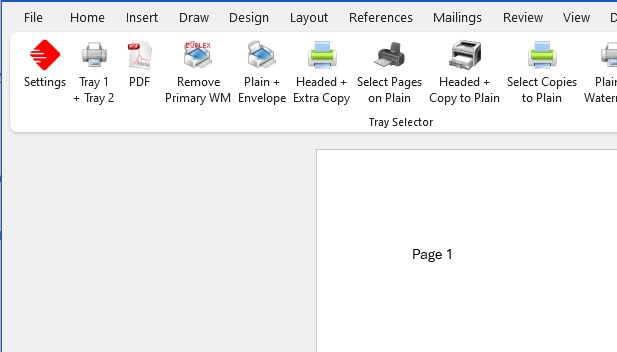
Click on the red settings button to create a new one-click printing button. In the configuration dialog, you'll need to:
- Enter a descriptive button name (for example, "Tray 1 + Tray 2")
- Select your target printer
- Specify which pages should print to which trays
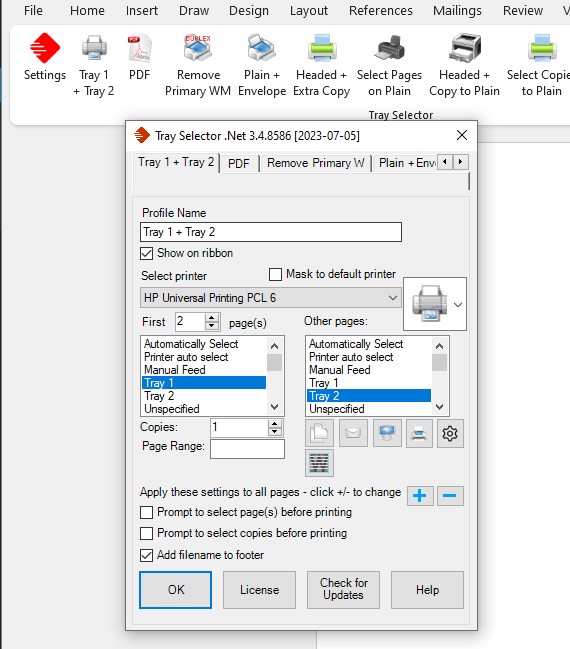
In this configuration, we're instructing Tray Selector to print the first two pages to Tray 1 and all remaining pages to Tray 2. You can also select the number of copies and optionally add the filename to the page footer for document tracking purposes.
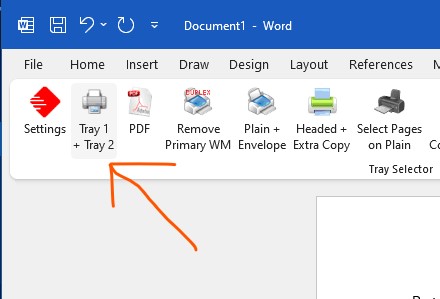
Once configured, simply click the "Tray 1 + Tray 2" button and your document will print according to these specifications every time. This eliminates the need to manually configure print settings for each print job, saving time and reducing errors.
Advanced Configuration
Tray Selector supports even more complex scenarios. You can create buttons that print to four or more different trays with custom page ranges for each. This is particularly useful for law firms that need to print complex documents with varying paper types including letterhead, exhibits, and backing pages.
Benefits of Using Tray Selector for Multiple Tray Printing
- Time Savings: Configure once, use repeatedly with a single click
- Consistency: Eliminate manual configuration errors
- Flexibility: Support for multiple trays and complex page ranges
- Professional Results: Ensure letterhead and special paper are used correctly every time
- Easy Setup: Intuitive configuration dialog makes setup straightforward
Get Started Today
If you're frequently printing documents that require different paper types or trays, Tray Selector can dramatically improve your workflow. The software includes a free 7-day trial so you can test this feature with your own documents and printers.
Having trouble getting it set up? Don't hesitate to contact our support team for assistance. We're here to help you get the most out of Tray Selector.